# Anonymous RP

# Présentation

**(An English version is available here :** [https://wiki.xelyos.fr/books/anonymous-rp/page/presentation](https://wiki.xelyos.fr/books/anonymous-rp/page/presentation-Lfh)**)**

### Pourquoi ?

<span style="white-space:pre-wrap;">Anonymous a été créé afin d'améliorer le RP sur les serveurs Discord. Le très connu </span>**//Anonyme//**<span style="white-space:pre-wrap;"> ou encore </span>**/ano**<span style="white-space:pre-wrap;"> n'est pas souvent pris au sérieux par tous les joueurs. C'est pourquoi nous avons développé une application dont le but est de remédier à cela.</span>

[![image-1652983574770.png](https://xelyos-wiki.s3.amazonaws.com/uploads/images/gallery/2025-04/scaled-1680-/image-1652983574770.png)](https://xelyos-wiki.s3.amazonaws.com/uploads/images/gallery/2025-04/image-1652983574770.png)

### Pour qui ?

Anonymous a été conçu principalement pour une utilisation sur les serveurs Role Play. Cependant, il peut également être utilisé sur d'autres types serveurs, tout dépend de vos attentes.

### Fonctionalités

#### Commandes utilisateurs

**`<strong class="editor-theme-bold editor-theme-code">/mask</strong>` :**<span style="white-space:pre-wrap;"> La fonction principale d'Anonymous est de permettre à vos utilisateurs de communiquer entre eux ou avec les autres de manière anonyme. C'est pourquoi Anonymous se charge de ça. Vous n'avez qu'à envoyer votre message en lui précisant que vous souhaitez qu'il soit anonyme et il se charge du reste.</span>

[![image-1652983702517.png](https://xelyos-wiki.s3.amazonaws.com/uploads/images/gallery/2025-04/scaled-1680-/image-1652983702517.png)](https://xelyos-wiki.s3.amazonaws.com/uploads/images/gallery/2025-04/image-1652983702517.png)

[![image-1652983909656.png](https://xelyos-wiki.s3.amazonaws.com/uploads/images/gallery/2025-04/scaled-1680-/image-1652983909656.png)](https://xelyos-wiki.s3.amazonaws.com/uploads/images/gallery/2025-04/image-1652983909656.png)

**`<strong class="editor-theme-bold editor-theme-code">/crypt</strong>` :**<span style="white-space:pre-wrap;"> Parfois, il est nécessaire de communiquer avec son partenaire mais il ne faut pas qu'une personne soit en mesure de connaitre le sujet de votre conversation. Pour cela, Anonymous a pensé à tout. Il est en mesure de crypter vos messages avec une clé que vous seul et vos partenaires connaîtriez.</span>

[![image-1652984026522.png](https://xelyos-wiki.s3.amazonaws.com/uploads/images/gallery/2025-04/scaled-1680-/image-1652984026522.png)](https://xelyos-wiki.s3.amazonaws.com/uploads/images/gallery/2025-04/image-1652984026522.png)

[![image.png](https://xelyos-wiki.s3.amazonaws.com/uploads/images/gallery/2025-04/scaled-1680-/image.png)](https://xelyos-wiki.s3.amazonaws.com/uploads/images/gallery/2025-04/image.png)

**`<strong class="editor-theme-bold editor-theme-code">/uncrypt</strong>` :**<span style="white-space:pre-wrap;"> Afin de déchiffrer un message, vous devez connaitre la clé de décryptage (identique à celle utilisée pour le cryptage). Une fois la commande entrée, anonymous vous communiquera en message privé le résultat de la phrase décryptée.</span>

[![image.png](https://xelyos-wiki.s3.amazonaws.com/uploads/images/gallery/2025-04/scaled-1680-/J9Kimage.png)](https://xelyos-wiki.s3.amazonaws.com/uploads/images/gallery/2025-04/J9Kimage.png)

[![image.png](https://xelyos-wiki.s3.amazonaws.com/uploads/images/gallery/2025-04/scaled-1680-/gYKimage.png)](https://xelyos-wiki.s3.amazonaws.com/uploads/images/gallery/2025-04/gYKimage.png)

[![image.png](https://xelyos-wiki.s3.amazonaws.com/uploads/images/gallery/2025-04/scaled-1680-/xiqimage.png)](https://xelyos-wiki.s3.amazonaws.com/uploads/images/gallery/2025-04/xiqimage.png)

#### Logs

Bien entendu, Anonymous garde un historique des messages que vous lui envoyez (cet historique sera uniquement visible par les administrateurs du serveur).

[![image.png](https://xelyos-wiki.s3.amazonaws.com/uploads/images/gallery/2025-04/scaled-1680-/Y5Yimage.png)](https://xelyos-wiki.s3.amazonaws.com/uploads/images/gallery/2025-04/Y5Yimage.png)

[![image.png](https://xelyos-wiki.s3.amazonaws.com/uploads/images/gallery/2025-04/scaled-1680-/39Ximage.png)](https://xelyos-wiki.s3.amazonaws.com/uploads/images/gallery/2025-04/39Ximage.png)[![image.png](https://xelyos-wiki.s3.amazonaws.com/uploads/images/gallery/2025-04/scaled-1680-/HlHimage.png)](https://xelyos-wiki.s3.amazonaws.com/uploads/images/gallery/2025-04/HlHimage.png)

[![image.png](https://xelyos-wiki.s3.amazonaws.com/uploads/images/gallery/2025-04/scaled-1680-/wXvimage.png)](https://xelyos-wiki.s3.amazonaws.com/uploads/images/gallery/2025-04/wXvimage.png)

# Installation

<span style="white-space:pre-wrap;">💡 Pour suivre les prochaines évolutions du bot, rejoignez notre Discord et obtenez le rôle </span>**Anonymous**.

#### Étape 1 — Inviter le bot sur votre serveur

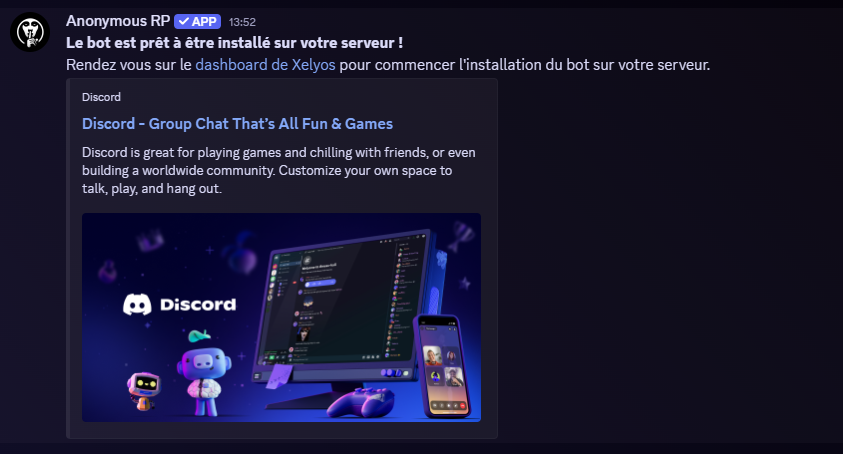
<span style="white-space:pre-wrap;">Cliquez sur le lien suivant pour inviter le bot : </span>[**Inviter le bot**](https://xelyos.fr/solution/anonyme-rp/invite)

<p class="callout warning">Vous devez être administrateur du serveur cible pour effectuer cette action.</p>

<span style="white-space:pre-wrap;">Une fois l'invitation confirmée, vous recevrez un </span>**message privé**<span style="white-space:pre-wrap;"> de la part du bot :</span>

[![image.png](https://xelyos-wiki.s3.amazonaws.com/uploads/images/gallery/2026-03/scaled-1680-/image.png)](https://xelyos-wiki.s3.amazonaws.com/uploads/images/gallery/2026-03/image.png)

#### Étape 2 — Initialisation du bot

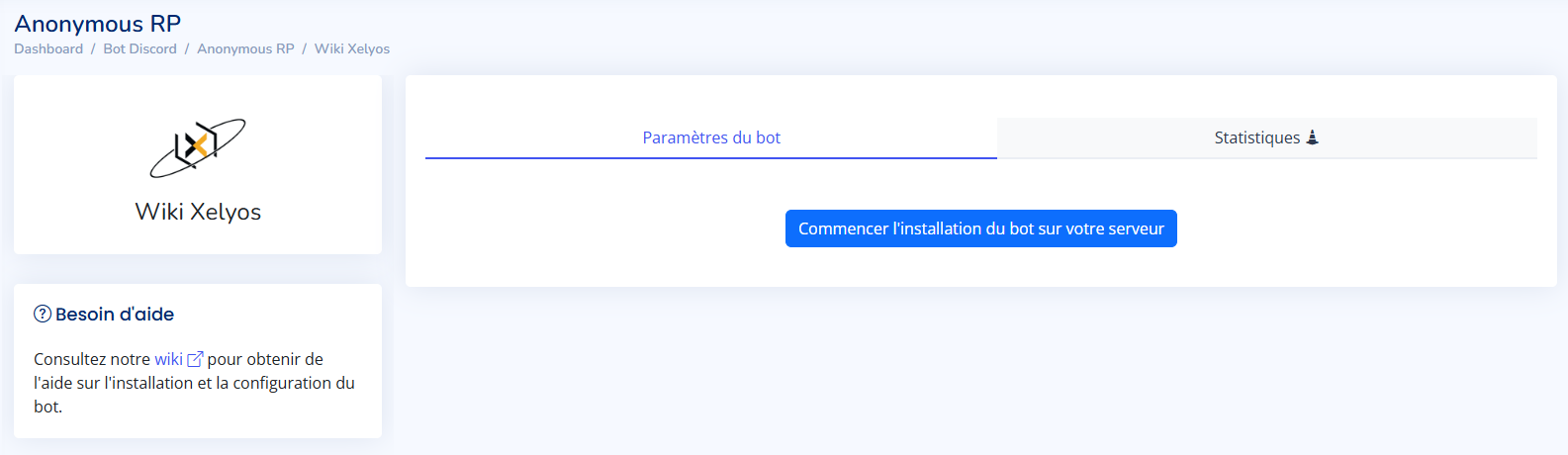
<span style="white-space:pre-wrap;">Rendez-vous sur le </span>[Dashboard Xelyos](https://dashboard.xelyos.fr/)<span style="white-space:pre-wrap;">, section </span>[**Bot Discord › Anonymous RP**](https://dashboard.xelyos.fr/bot/anonyme-rp/).

La page affiche la liste des serveurs que vous possédez et sur lesquels le bot est installé.

[![image.png](https://xelyos-wiki.s3.amazonaws.com/uploads/images/gallery/2026-03/scaled-1680-/LTkimage.png)](https://xelyos-wiki.s3.amazonaws.com/uploads/images/gallery/2026-03/LTkimage.png)
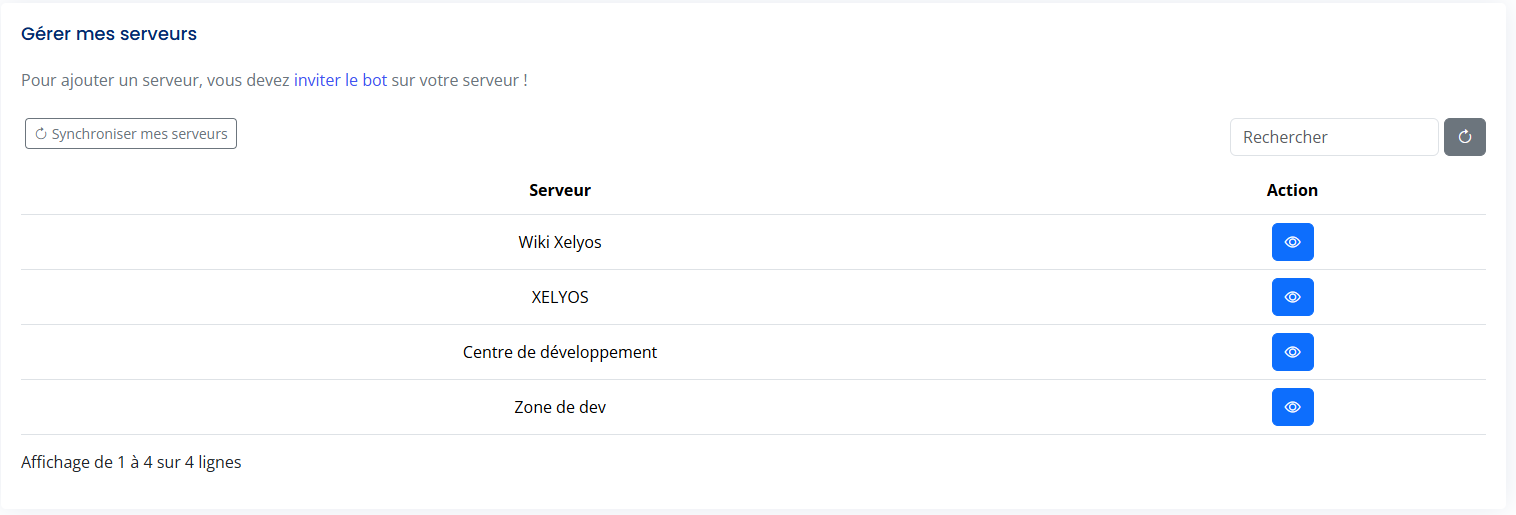
<p class="callout info"><span style="white-space:pre-wrap;">Votre serveur n'apparaît pas ? Cliquez sur </span>**Synchroniser mes serveurs**</p>

<span style="white-space:pre-wrap;">Sélectionnez votre serveur, puis cliquez sur le bouton </span>**Initialiser le bot**.

[![image.png](https://xelyos-wiki.s3.amazonaws.com/uploads/images/gallery/2026-03/scaled-1680-/HGuimage.png)](https://xelyos-wiki.s3.amazonaws.com/uploads/images/gallery/2026-03/HGuimage.png)

Cette action crée automatiquement :

[![image.png](https://xelyos-wiki.s3.amazonaws.com/uploads/images/gallery/2026-03/scaled-1680-/NHwimage.png)](https://xelyos-wiki.s3.amazonaws.com/uploads/images/gallery/2026-03/NHwimage.png)
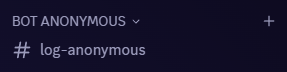
<p class="callout danger">Le bot ne fonctionnera pas sans un channel de logs valide.</p>

# Configuration du bot

<span style="white-space:pre-wrap;">La configuration du bot Anonymous s'effectue entièrement depuis le </span>[**Dashboard Xelyos**](https://dashboard.xelyos.fr/bot/anonyme-rp).

<p class="callout warning"><span style="white-space:pre-wrap;">(2026-03-30) Pour le moment, seul le </span>**propriétaire**<span style="white-space:pre-wrap;"> du bot peut accéder au panel de configuration. L'accès pour les administrateurs est en cours de développement</span></p>

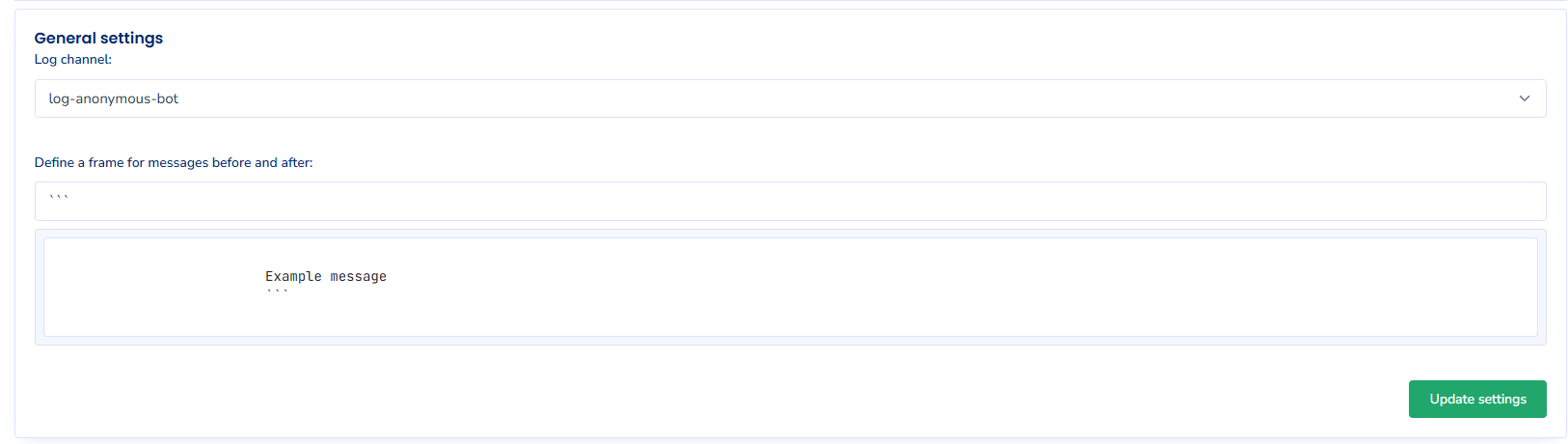
### Channel de logs &amp; encadrement des messages

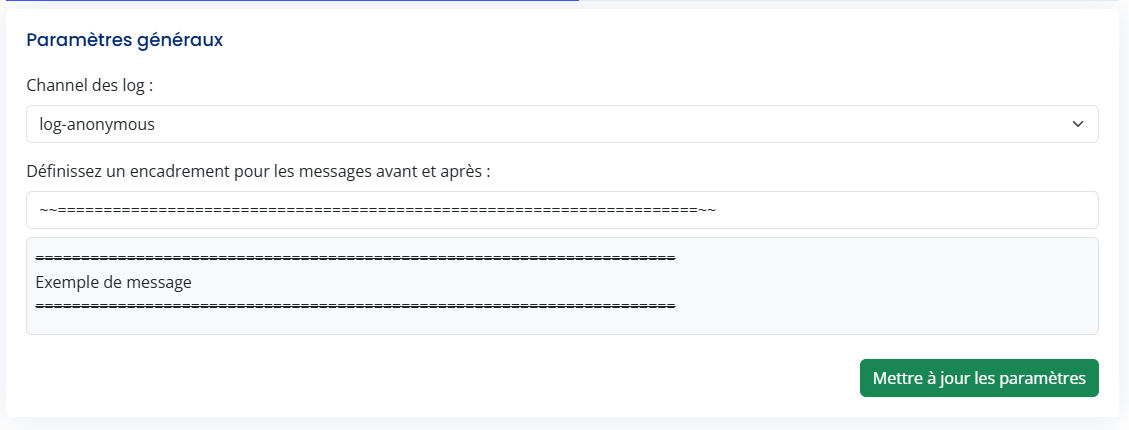
Cette section permet de définir :

- <span style="white-space:pre-wrap;">le </span>**channel de logs**<span style="white-space:pre-wrap;"> utilisé par le bot</span>
- l'**encadrement des messages**<span style="white-space:pre-wrap;"> (éléments visuels entourant chaque message envoyé par le bot).</span>

[![image.png](https://xelyos-wiki.s3.amazonaws.com/uploads/images/gallery/2026-03/scaled-1680-/fmJimage.png)](https://xelyos-wiki.s3.amazonaws.com/uploads/images/gallery/2026-03/fmJimage.png)

<p class="callout info"><span style="white-space:pre-wrap;">Pour afficher les messages sans encadrement, laissez le champ </span>**Encadrement** vide.</p>

---

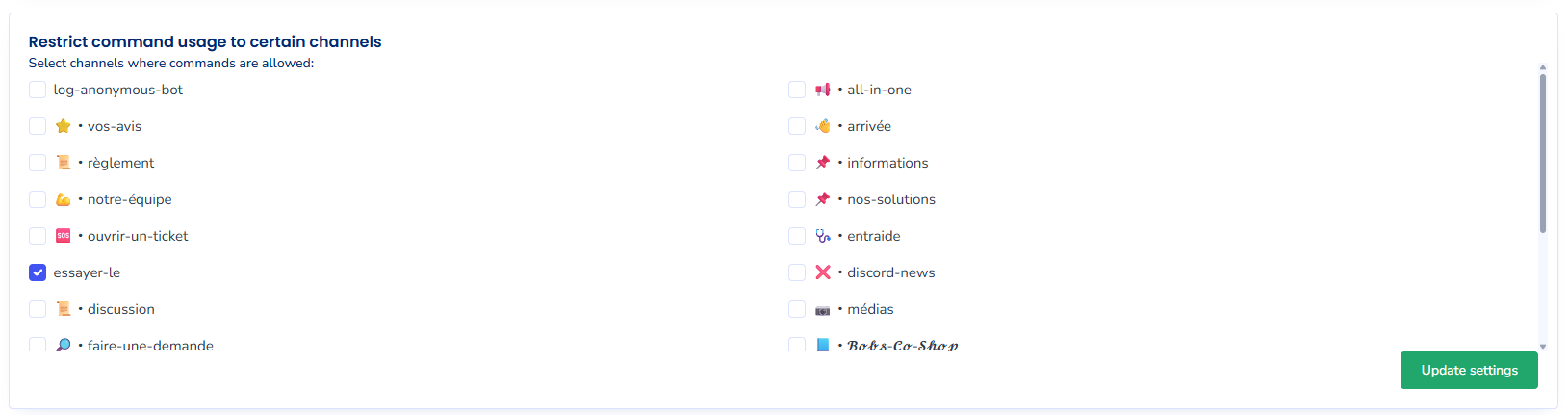
### Restriction des commandes par channel

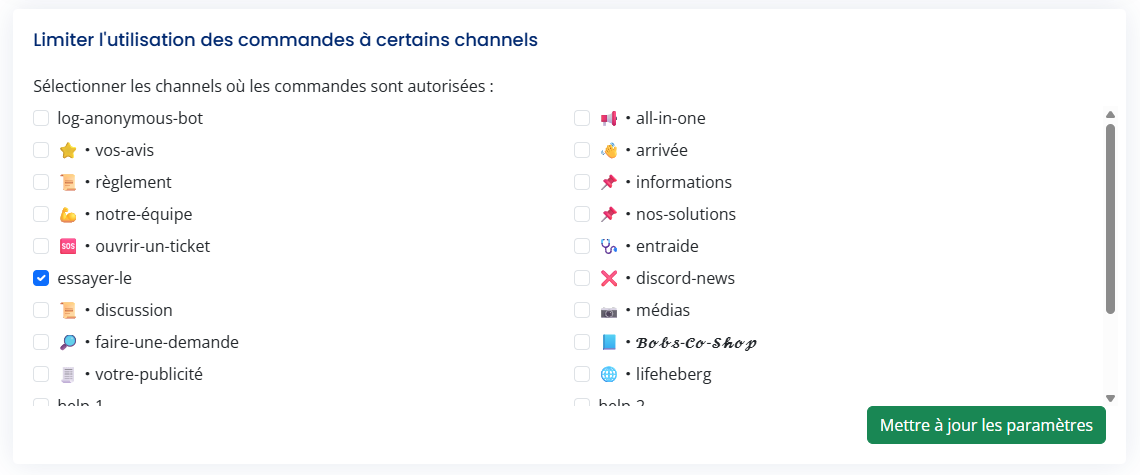
<span style="white-space:pre-wrap;">Cette section permet de restreindre l'utilisation des commandes du bot à des </span>**channels spécifiques**.

[![image.png](https://xelyos-wiki.s3.amazonaws.com/uploads/images/gallery/2026-03/scaled-1680-/b0Nimage.png)](https://xelyos-wiki.s3.amazonaws.com/uploads/images/gallery/2026-03/b0Nimage.png)

<p class="callout info">Si aucun channel n'est défini, les commandes sont utilisables partout sur le serveur.</p>

---

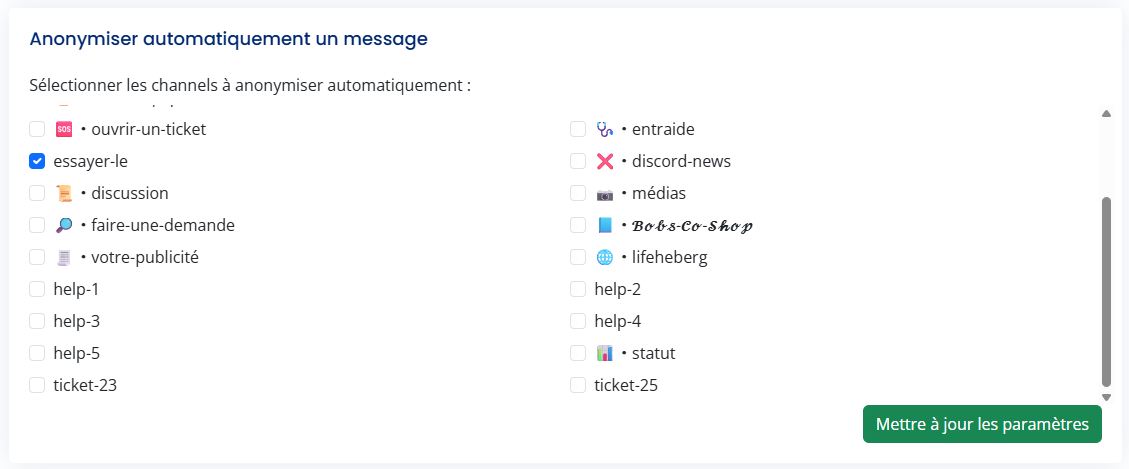
### Masquage automatique des messages

<span style="white-space:pre-wrap;">Cette fonctionnalité permet de </span>**masquer automatiquement**<span style="white-space:pre-wrap;"> les messages envoyés par le bot dans les channels de votre choix.</span>

[![image.png](https://xelyos-wiki.s3.amazonaws.com/uploads/images/gallery/2026-03/scaled-1680-/qN0image.png)](https://xelyos-wiki.s3.amazonaws.com/uploads/images/gallery/2026-03/qN0image.png)

<p class="callout warning">Le masquage automatique s'applique uniquement aux messages envoyés.</p>

<p class="callout info"><span style="white-space:pre-wrap;"> Les autres commandes du bot restent utilisables normalement dans ces channels.</span></p>

# English

# Presentation

### Why?

Anonymous was created to enhance role-playing (RP) on Discord servers. The well-known //Anonymous// or /ano is often not taken seriously by all players. That's why we developed an application aimed at addressing this issue

[![image.png](https://xelyos-wiki.s3.amazonaws.com/uploads/images/gallery/2025-04/scaled-1680-/jYoimage.png)](https://xelyos-wiki.s3.amazonaws.com/uploads/images/gallery/2025-04/jYoimage.png)

### For whom?

Anonymous was mainly designed for use on Role Play servers. However, it can also be used on other types of servers, depending on your needs.

### Features

#### User Commands

`<span class="editor-theme-code">/mask</span>`: The main function of Anonymous is to allow your users to communicate anonymously with each other or with others. That's why Anonymous takes care of that. You just have to send your message specifying that you want it to be anonymous, and it takes care of the rest.

[![image.png](https://xelyos-wiki.s3.amazonaws.com/uploads/images/gallery/2025-04/scaled-1680-/Bs7image.png)](https://xelyos-wiki.s3.amazonaws.com/uploads/images/gallery/2025-04/Bs7image.png)

[![image.png](https://xelyos-wiki.s3.amazonaws.com/uploads/images/gallery/2025-04/scaled-1680-/LU7image.png)](https://xelyos-wiki.s3.amazonaws.com/uploads/images/gallery/2025-04/LU7image.png)

`<span class="editor-theme-code">/crypt</span>`: Sometimes, it is necessary to communicate with your partner, but it should not be possible for someone to know the subject of your conversation. For this, Anonymous has thought of everything. It can encrypt your messages with a key that only you and your partners would know.

[![image.png](https://xelyos-wiki.s3.amazonaws.com/uploads/images/gallery/2025-04/scaled-1680-/sT1image.png)](https://xelyos-wiki.s3.amazonaws.com/uploads/images/gallery/2025-04/sT1image.png)

[![image.png](https://xelyos-wiki.s3.amazonaws.com/uploads/images/gallery/2025-04/scaled-1680-/8mOimage.png)](https://xelyos-wiki.s3.amazonaws.com/uploads/images/gallery/2025-04/8mOimage.png)

`<span class="editor-theme-code">/uncrypt</span>`: To decrypt a message, you need to know the decryption key (identical to the one used for encryption). Once the command is entered, Anonymous will communicate the decrypted result to you via a private message.

[![image.png](https://xelyos-wiki.s3.amazonaws.com/uploads/images/gallery/2025-04/scaled-1680-/Nmeimage.png)](https://xelyos-wiki.s3.amazonaws.com/uploads/images/gallery/2025-04/Nmeimage.png)

[![image.png](https://xelyos-wiki.s3.amazonaws.com/uploads/images/gallery/2025-04/scaled-1680-/xcKimage.png)](https://xelyos-wiki.s3.amazonaws.com/uploads/images/gallery/2025-04/xcKimage.png)

[![image.png](https://xelyos-wiki.s3.amazonaws.com/uploads/images/gallery/2025-04/scaled-1680-/q1Himage.png)](https://xelyos-wiki.s3.amazonaws.com/uploads/images/gallery/2025-04/q1Himage.png)

#### Logs

Of course, Anonymous keeps a history of the messages you send it (this history will only be visible to the server administrators).

[![image.png](https://xelyos-wiki.s3.amazonaws.com/uploads/images/gallery/2025-04/scaled-1680-/JkOimage.png)](https://xelyos-wiki.s3.amazonaws.com/uploads/images/gallery/2025-04/JkOimage.png)

[![image.png](https://xelyos-wiki.s3.amazonaws.com/uploads/images/gallery/2025-04/scaled-1680-/BkBimage.png)](https://xelyos-wiki.s3.amazonaws.com/uploads/images/gallery/2025-04/BkBimage.png)

[![image.png](https://xelyos-wiki.s3.amazonaws.com/uploads/images/gallery/2025-04/scaled-1680-/K6uimage.png)](https://xelyos-wiki.s3.amazonaws.com/uploads/images/gallery/2025-04/K6uimage.png)

[![image.png](https://xelyos-wiki.s3.amazonaws.com/uploads/images/gallery/2025-04/scaled-1680-/73zimage.png)](https://xelyos-wiki.s3.amazonaws.com/uploads/images/gallery/2025-04/73zimage.png)

# Installation

<span style="white-space: pre-wrap;">💡 To stay up to date on upcoming bot improvements, join our Discord and get the </span>**Anonymous**<span style="white-space: pre-wrap;"> role.</span>

#### Step 1 — Invite the bot to your server

<span style="white-space: pre-wrap;">Click the following link to invite the bot: </span>[**Invit the bot**](https://xelyos.fr/solution/anonyme-rp/invite)

<p class="callout warning">You must be an administrator of the target server to perform this action.</p>

<span style="white-space: pre-wrap;">Once the invitation is confirmed, you will receive a </span>**private message**<span style="white-space: pre-wrap;"> from the bot.</span>

[![image.png](https://xelyos-wiki.s3.amazonaws.com/uploads/images/gallery/2026-03/scaled-1680-/image.png)](https://xelyos-wiki.s3.amazonaws.com/uploads/images/gallery/2026-03/image.png)

#### Step 2 — Initialize the bot

Go to the [**Xelyos Dashboard**](https://dashboard.xelyos.fr/)<span style="white-space: pre-wrap;">, under </span>[**Discord Bot › Anonymous RP**](https://dashboard.xelyos.fr/bot/anonyme-rp/).

The page displays the list of servers you own where the bot is installed.

[![image.png](https://xelyos-wiki.s3.amazonaws.com/uploads/images/gallery/2026-03/scaled-1680-/LTkimage.png)](https://xelyos-wiki.s3.amazonaws.com/uploads/images/gallery/2026-03/LTkimage.png)

<p class="callout info"><span style="white-space: pre-wrap;">Can't find your server? Click </span>**Sync my servers**.</p>

<span style="white-space: pre-wrap;">Select your server, then click the </span>**Initialize bot**<span style="white-space: pre-wrap;"> button.</span>

[![image.png](https://xelyos-wiki.s3.amazonaws.com/uploads/images/gallery/2026-03/scaled-1680-/HGuimage.png)](https://xelyos-wiki.s3.amazonaws.com/uploads/images/gallery/2026-03/HGuimage.png)

This will automatically create:

[![image.png](https://xelyos-wiki.s3.amazonaws.com/uploads/images/gallery/2026-03/scaled-1680-/NHwimage.png)](https://xelyos-wiki.s3.amazonaws.com/uploads/images/gallery/2026-03/NHwimage.png)

<p class="callout danger">The bot will not work without a valid log channel.</p>

# Configuration

<span style="white-space: pre-wrap;">The Anonymous bot is configured entirely from the </span>[**Xelyos Dashboard**](https://dashboard.xelyos.fr/bot/anonyme-rp).

<p class="callout warning"><span style="white-space: pre-wrap;">(2026-03-30) Currently, only the bot </span>**owner** can access the configuration panel. Administrator access is under development.</p>

### Log channel &amp; message framing

This section allows you to define:

- <span style="white-space: pre-wrap;">the </span>**log channel**<span style="white-space: pre-wrap;"> used by the bot;</span>
- <span style="white-space: pre-wrap;">the </span>**message frame**<span style="white-space: pre-wrap;"> (visual elements surrounding each message sent by the bot).</span>

[![image.png](https://xelyos-wiki.s3.amazonaws.com/uploads/images/gallery/2026-03/scaled-1680-/fmJimage.png)](https://xelyos-wiki.s3.amazonaws.com/uploads/images/gallery/2026-03/fmJimage.png)

<p class="callout info"><span style="white-space: pre-wrap;">To display messages without a frame, leave the </span>**Frame**<span style="white-space: pre-wrap;"> field empty.</span></p>

---

### Command restriction by channel

<span style="white-space: pre-wrap;">This section allows you to restrict the use of bot commands to </span>**specific channels**.

[![image.png](https://xelyos-wiki.s3.amazonaws.com/uploads/images/gallery/2026-03/scaled-1680-/b0Nimage.png)](https://xelyos-wiki.s3.amazonaws.com/uploads/images/gallery/2026-03/b0Nimage.png)

<p class="callout info">If no channel is defined, commands can be used anywhere on the server.</p>

---

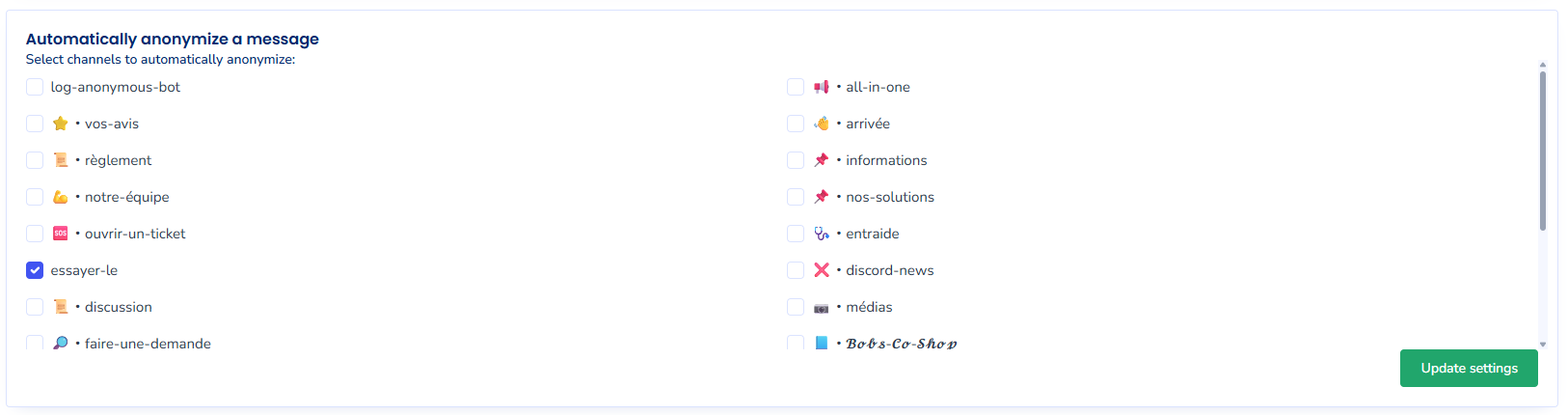
### Automatic message hiding

<span style="white-space: pre-wrap;">This feature allows you to </span>**automatically hide**<span style="white-space: pre-wrap;"> messages sent by the bot in the channels of your choice.</span>

<span style="white-space: pre-wrap;">Cette fonctionnalité permet de </span>**masquer automatiquement**<span style="white-space: pre-wrap;"> les messages envoyés par le bot dans les channels de votre choix.</span>

[![image.png](https://xelyos-wiki.s3.amazonaws.com/uploads/images/gallery/2026-03/scaled-1680-/qN0image.png)](https://xelyos-wiki.s3.amazonaws.com/uploads/images/gallery/2026-03/qN0image.png)

<p class="callout warning">Automatic hiding only applies to automatically sent messages.</p>

<p class="callout info">Other bot commands remain fully usable in those channels.</p>